


Beanstack Tracker
4.72.02K Reviews
App Specs
- Version
- 6.1.5
- Updated On
- License
- Free
- Downloads
- 500,000+
- Developer
- Zoobean, Inc.
- Categories
- Education
- Platform
- Android
Screenshots

 Analysis by AppCompare
Ever found yourself lost in a sea of apps, trying to find the perfect one to track your reading habits? Well, let me introduce you to the Beanstack Tracker. This little gem is like a personal librarian living right in your pocket. I’ve spent some quality time with this app, and here’s my take on it.
What the free access means
Beanstack Tracker is a free reading app from Zoobean, Inc., so there is no purchase price to weigh against its usefulness. I see that as a low-risk way to try a different reading routine: you can find out whether logging books and joining challenges actually helps you before deciding to make it part of your day. Free access is especially appealing for families or readers who want a shared activity without adding another paid subscription to the household budget.
The app is rated for Everyone, and its average rating is 4.7 from around 18,000 ratings. That gives a prospective reader a useful sense of its reception, but popularity alone does not tell you whether its approach will suit you. Its value depends less on collecting every reading statistic and more on whether a visible log or a challenge makes you want to pick up a book again.
Getting Started with Beanstack Tracker
Diving into the Beanstack Tracker is as smooth as a hot knife through butter. Setting it up is a breeze; you can sign up using your email or even link it to your library account if they’re partnered. Once you’re in, the app greets you with a clean and user-friendly interface. No clutter, just the way I like it! You’ll find the main menu at the bottom, giving you quick access to your reading log, challenges, and more.
Logging Your Reading
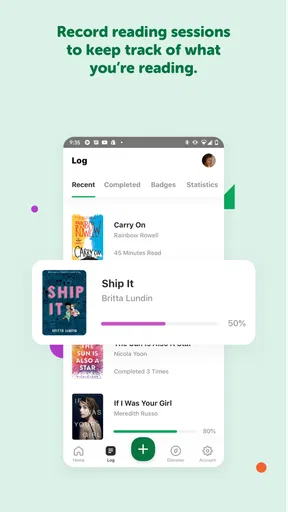
One of the standout features of the app is the ease with which you can log your reading. Whether you're devouring a hardcover, an audiobook, or an e-book, Beanstack Tracker has got you covered. Just scan the ISBN, and voilà, your book details are fetched automatically. For audiophiles, there’s a nifty timer feature to track how long you’ve been listening, which I find pretty handy. No more guessing games!
Making the log work in everyday life
A log is only useful if it is easy enough to keep current. I’d make a habit of recording a session right after reading rather than trying to reconstruct a whole week later. That matters most when you switch between formats: a few pages before bed, an audiobook during a commute, and an e-book at lunch can blur together quickly. The timer makes listening sessions easier to capture, while the ISBN scan can save effort when a printed book has a readable barcode.
Scanning is convenient, but it is not a reason to skip checking the entry. If a book is borrowed, old, or otherwise hard to identify by its ISBN, manual logging is a sensible fallback if available in your setup; a quick glance at the title and format also helps keep your record meaningful. I would treat the log as a personal memory aid, not a perfect catalog. Readers who care about editions, detailed notes, or a library-like inventory may want a dedicated book catalog alongside it.
Worth Reading Before You Choose

EA SPORTS FC Mobile 26 Is a Bigger Football Game, but It Takes Time

Flipboard Shows What News Apps Must Do Beyond the Feed

Switching to Android Auto Means Rethinking Your Driving Routine

Google Calendar Makes a Crowded Week Easier to Manage

Ludo King Makes the Most of the Minutes Between Plans

Baby Panda World Brings Quick Play to Modern Phones, but Its Game Library Feels Busy
Challenges and More
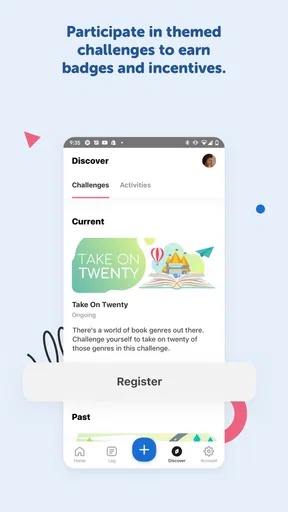
Now, let’s talk about challenges, shall we? If you’re someone who needs a little nudge to keep the pages turning, the challenges feature is your new best friend. From daily reading goals to themed challenges, there’s something for everyone. And the best part? You can earn badges along the way. Who doesn’t love a bit of gamification to spice things up?
Choosing goals that encourage rather than nag
The most useful challenge is not necessarily the most ambitious one. I’d start with a target that fits a normal week, then adjust only after seeing whether it feels motivating or like homework. A busy reader can use a small, regular goal to protect a few minutes for reading; a child may enjoy the visible progress and badges more than a bare tally. If a challenge starts turning leisure into a streak to preserve at all costs, it is reasonable to step back. The point is to make reading easier to return to, not to make missed days feel like failure.
For a realistic routine, imagine a parent and child reading together after dinner. They can use a challenge as a gentle prompt, log the session while the book is still on hand, and let the progress become a topic for the next library visit. That small workflow makes the app more than a counter: it connects a real reading moment to a goal without requiring a long planning session. It works best when the adult keeps the activity relaxed and lets the child choose books, rather than treating badges as a reward system that must be completed.
Community and Sharing
If you’re a social butterfly, you’ll appreciate the community aspect of the app. You can add friends, share your progress, and even recommend books. It’s like having a mini book club at your fingertips. I’ve found some great recommendations this way, and it’s always fun to see what others are reading.
When sharing adds value
Sharing is most helpful when it gives you a reason to talk about books, not when it becomes another feed to keep up with. I’d use recommendations from friends as prompts for a library search or a family conversation, while remembering that their tastes may not match mine. If you prefer to keep reading private, you can focus on the personal log and challenges instead of treating the social side as essential. The app’s community angle is a bonus, not the reason every reader needs to use it.
Customizing Your Experience
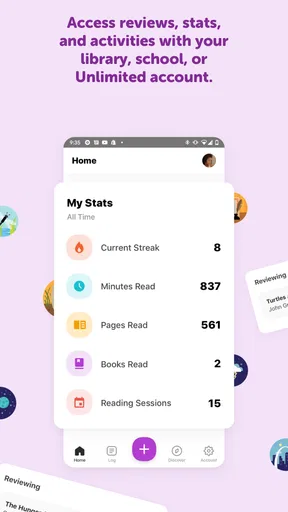
Customization is key, and Beanstack Tracker doesn’t disappoint. You can tailor your reading log to fit your style, whether you’re into stats or just want a simple list. The app also provides insightful reports, so you can see your reading habits over time. It’s a bit like having your own personal reading assistant.
How it compares with other reading tools
Compared with a notebook or a basic notes app, Beanstack gives reading goals and challenges a more prominent place, which can be more engaging for someone who responds to visible progress. A spreadsheet or book-cataloging tool may be a better fit for readers who want to organize a large collection, record detailed opinions, or sort books in very specific ways. A general habit tracker can handle a daily reading reminder, but it will not feel as centered on books and reading activity. I’d choose based on what I actually want to maintain: motivation and a reading record here, or deeper catalog controls elsewhere.
The reports are most useful when you look for patterns rather than judging yourself by a single number. For example, noticing that reading happens more often on certain days can help you protect that time. If tracking begins to distract from the book itself, simplifying what you record is a better response than trying to fill every field. That is a practical trade-off: the more detail you expect from any tracker, the more effort it takes to keep accurate.
Room for Improvement
While the app is pretty solid, there are a few areas where it could level up. For instance, the notifications can be a bit persistent at times. I mean, I love a good reminder, but sometimes it feels like my phone is more eager for me to read than I am! Also, while the app is generally smooth, I’ve noticed occasional hiccups when loading certain features. Nothing too major, but worth mentioning.
Those small frictions matter because a reading tracker should support a calm habit, not interrupt it. I’d treat reminders as optional prompts and adjust them if they become irritating; a notification that repeatedly arrives at the wrong time can make the app feel like a chore. The occasional loading delay is also worth keeping in mind if you expect to record every session instantly. If an entry can wait, jotting down the detail mentally and logging it later may be less frustrating than letting a brief technical pause break a reading moment.
Who is likely to get the most from it?
I’d recommend trying Beanstack Tracker if you want a free, book-focused way to build consistency, especially if challenges help you follow through or your library is partnered with the service. Families can use it to make shared reading visible, while individual readers can use the log and reports to notice their habits. It has also reached over 500,000 installs, and its current version is 6.0.14, but neither figure guarantees that its particular mix of tracking and motivation will fit every person.
I would skip it if your main goal is to manage a personal library in fine detail, if you strongly dislike badges and goals, or if you want a tracker that stays entirely out of your way. Before relying on a library connection, check whether your own library participates; that connection is conditional, not something every reader should assume. The app can still make sense as a reading log without that link, but someone who wants a library-first workflow may prefer the library’s own tools.
People often wonder whether this is only useful for children or whether it can serve an adult reader too. I think either can use it: the challenge-and-badge style may be especially inviting for younger readers, while adults can focus on recording books and looking back at their activity. Another practical question is whether every kind of reading can be tracked. The app’s described approach covers print, e-books, and audiobooks, with the timer particularly useful for listening; the best fit depends on whether that level of tracking matches your routine.
Beanstack Tracker was released on April 30, 2018, and its minimum operating-system requirement is version 8.0. If you are considering installing it on an older device, checking that requirement first can save time. That is a more useful compatibility check than assuming a reading app will run on every phone simply because its basic task sounds simple.
Overall, the Beanstack Tracker is a fantastic tool for both casual readers and bookworms alike. Its user-friendly interface, combined with robust features, makes it a top choice for anyone looking to keep track of their reading journey. So, if you’re ready to dive into a sea of books and track your progress like a pro, give this app a whirl. Trust me, your bookshelf will thank you!
My verdict on the value
For a free app, the most convincing reason to try it is the combination of a reading log, challenges, and a way to look back at your activity without paying upfront. I would not judge its value by how many badges I earn or how often I open it; I’d judge it by whether I read more willingly and remember what I’ve been reading. If that happens, the app is doing something useful. If I find myself maintaining the tracker more than enjoying books, a notebook or a simpler habit reminder would be a better choice.
Pros
- User-friendly interface for easy navigation.
- Customizable reading challenges and goals.
- Integration with various libraries and schools.
- Real-time progress tracking features.
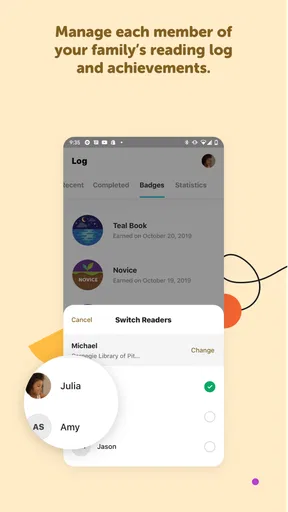
- Supports multiple user profiles in one account.
Cons
- Limited offline functionality for remote access.
- Notifications can be overwhelming at times.
- Some features require premium access.
- Occasional sync issues with library accounts.
- Initial setup can be time-consuming.
FAQs for Beanstack Tracker
What is Beanstack Tracker and how does it work?
Beanstack Tracker is a reading app designed to help users track their reading habits, participate in challenges, and earn badges. Users can log reading sessions, set goals, and join community reading programs. The app offers features for both individual users and libraries, making it versatile for personal or educational use.
Is Beanstack Tracker suitable for all age groups?
Yes, Beanstack Tracker is designed for users of all ages. It offers features that cater to children, teens, and adults, making it a family-friendly app. Parents and educators can use it to encourage children to read, while adults can track their own reading goals and participate in community challenges.
Does Beanstack Tracker require an internet connection to function?
While Beanstack Tracker requires an internet connection to access certain features such as syncing data and participating in community challenges, users can still log reading sessions offline. The app will update and sync the data once an internet connection is re-established, ensuring no reading logs are lost.
Can I use Beanstack Tracker without a library account?
Yes, you can use Beanstack Tracker without linking it to a library account. The app allows for individual use, where you can set personal reading goals and track your progress independently. However, connecting with a library can enhance your experience by providing access to community challenges and programs.
How secure is my data on Beanstack Tracker?
Beanstack Tracker prioritizes user data security by implementing robust privacy measures. The app ensures that personal information and reading logs are stored securely. Users have control over their data, and the app complies with standard data protection regulations to safeguard user privacy at all times.


